Content indexing and search-engine tools are not new to most users of the Web or the Internet. However, their importance to users at all levels is increasing. As the number of Internet and intranet sites proliferate at a staggering pace, the amount of information available to users is quickly reaching a point where finding pertinent information is an overwhelming task—even for the most experienced users.
Time is a valuable commodity for most people, and one of the greatest challenges facing WWW/Internet information and content providers is how to provide users with the tools to easily and rapidly navigate, search, and retrieve information in a reasonable period of time. Efforts to provide such tools are being stymied by the exponential growth in the volume of content available to users at many sites. This is especially so for large corporate and government Internet sites that have a mandate to make vast archives of data and information available to the public. Other organizations are also starting to feel the pinch on their rapidly growing intranets. Even the most experienced surfers can be quickly overwhelmed when trying to find data and information at the most well designed site.
While several indexing and search tools are available, many are tricky to set up and administer, difficult for the user to master, slow and inefficient, or simply low on the more advanced querying features that today's users demand. And what about information that is not already in HTML format (such as FTP repositories, and other file systems full of documents stored in a variety of word processing and graphical formats)? Much of this content, as well as information about document properties, is simply hidden from users because there is no easy way to find it using today's standard search tools. Microsoft's Index Server was designed to address these problems and shortcomings. Index Server provides a highly configurable and customizable, easy-to-use, and very efficient indexing and search tool for round-the-clock operations at the most demanding Web sites. Index Server is an add-on component to Microsoft Internet Information Server (IIS) that provides comprehensive content and property indexing as well as search capabilities for content administered by IIS.
This chapter presents an overview of Microsoft's Index Server. It starts by reviewing some of the fundamental features and capabilities of IIS. Following this discussion, we will provide a basic introduction to Index Server and briefly outline some of its major capabilities, including querying, indexing, server administration, and security features. Finally, you will be introduced to a number of fundamental Index Server terms and concepts, which will be covered in greater detail in subsequent chapters.
In simple terms, IIS is a Web server; that is, it's a collection of software programs designed to service requests for information and other resources from clients on the Internet, World Wide Web, or organizational intranets. In a broader sense, IIS is a comprehensive Web server and Web-publishing system designed especially for use with the Microsoft Windows NT Server operating system. IIS capabilities and functionality are also available as Peer Web Services (PWS) for the NT Workstation operating systems. In subsequent discussions, the term IIS will be used to refer to IIS and PWS collectively (except where distinction is necessary).
IIS provides the ability to easily publish information and handle file-transfer requests on organizational intranets, Web sites, and the Internet using IIS's fully integrated World Wide Web (WWW), File Transfer Protocol (FTP), and Gopher services. IIS also provides a suite of graphical and HTML-based administrative tools that make installation, configuration, and management of these services quick and easy. Additionally, IIS allows developers to extend the functionality of the server by providing full support for the development of Web applications with the Internet Server Applications Programming Interface (ISAPI), the Common Gateway Interface (CGI), and the Internet Database Connector (IDC). IIS is tightly integrated with other Microsoft products such as the BackOffice suite of applications and add-ons such as Index Server. Finally, IIS can be used in conjunction with Microsoft's FrontPage Internet authoring tool (using available IIS server extensions) .
IIS provides a wide range of services, features, and capabilities for creating Web sites and publishing information. Fundamental knowledge of IIS features and capabilities is important for users of Index Server because Index Server is such a tightly integrated add-on component to IIS. Readers are encouraged to review the online IIS product documentation for detailed coverage of IIS. Following are brief summaries that highlight the primary components and capabilities of IIS.
The WWW service is the primary workhorse of IIS. It allows the user to publish information, such as HTML-based documents, for users to access via a multitude of Web browsers such as Microsoft Internet Explorer, Netscape, and Mosaic. Additionally, the WWW service allows the creation and management of comprehensive Web sites with advanced features such multi-homing, directory browsing, virtual servers, virtual directories, and graphical administration tools.
The WWW service implements the Hypertext Transfer Protocol (HTTP). HTTP specifies how a Web server handles client requests as well as how information is transmitted (generally as HTML pages) back to the requester. In other words, the WWW service handles all Web requests of the type http://<domainname>/<path_to_information>. The IIS Web Server also provides support for developers to design and implement applications using ISAPI, CGI and IDC. This provides a powerful mechanism for developers to extend the base WWW service functionality and to respond to client requests with dynamically generated HTML pages (which can include VBScript and JavaScript active content) and access to a variety of databases and database applications (which need not physically reside on the Web server) as well as many other custom applications that are not natively supported by most Web servers.
The File Transfer Protocol is of the older protocols in use on TCP/IP based networks. True to its name, FTP was designed to allow transfers of files between computers (regardless of differences in hardware platforms and operating systems) somewhere on the network (or Internet). The FTP service provides an easily configured, easy-to-manage method of setting up an FTP site and making files on your system available to client computers on the Web, Internet, or an intranet. Users can log in to the FTP site and browse available directories and files to find those they want to download. Basically, all that is required is to enable the service and point the FTP service to the location of the files on your system. These files can exist in a variety of formats, including text documents, multimedia files, application executables, and so on.
The Gopher service provides another method by which you can publish existing files residing on your system. While Gopher is similar to FTP, it provides some additional functionality that addresses limitations of FTP, including the capability to create custom menus and links to other computers and/or services, as well as to annotate files on your system. To establish a Gopher site, simply enable the service and put copies of files you want to make available in the home directory for the Gopher service (this is \InetPub\Gophroot for the default installation). Clients can then browse the available directories and files. In addition to the standard Gopher functionality, the IIS Gopher service provides some nice extensions, including support for Gopher Plus selector strings. These strings allow additional information, such as the MIME type, the administrator's name, and the modification date to be returned to clients by the server.
IIS provides a variety of methods for configuring and administering IIS features. IIS includes a graphical- and HTML-based tool called Internet Services Manager, which allows the following administrative functions to be performed:
In addition to the Internet Services Manager tool, other Windows NT tools can be used to administer IIS. For example:
IIS provides a variety of methods for controlling access to your site and ensuring a reasonable level of security. Because IIS was designed to be tightly integrated with Windows NT, it is built on the NT security model and benefits from some of NT's security features. Following are a few of the available security features:
Microsoft Index Server is a content-indexing, property-indexing, and search tool designed specifically for use with Internet Information Server and Peer Web Services running under Windows NT Server and Windows NT Workstation, respectively. It was designed to be virtually maintenance free (allowing 24x7 operations) and very easy to administer. Index Server provides an excellent means of indexing both the textual contents and the properties of formatted documents on intranets and Web Sites. Additionally, Index Server can be used to perform indexing on any drive on the Internet that is accessible through a uniform naming convention (UNC) path.
Index Server does more than just index documents, however. It provides a full-fledged system for publishing information on your intranet, Web, or Internet site. Because Index Server indexes both content and properties of formatted documents on your site, you are no longer forced to convert existing documents to HTML to make them available to your users. Instead, documents in a variety of formats, such as Microsoft Word or Microsoft Excel, are made directly available.
Finally, Index Server provides comprehensive document-querying capabilities. Armed with a comprehensive query language, a quick and efficient search engine, and mechanisms for creating query scripts and report templates, Index Server can be used to provide your users with very powerful form-based search capabilities using the HTML pages with which they have become familiar.
Index Server provides a number of tools and methods for publishing, indexing, and serving formatted documents from IIS. The following sections present an overview of the following basic capabilities of Index Server:
Index Server provides a variety of basic document indexing capabilities, including
Index Server provides a variety of querying capabilities that allow a great deal of control over which documents are searched, how queries can be focused using restrictions, and how results are displayed to users. These include
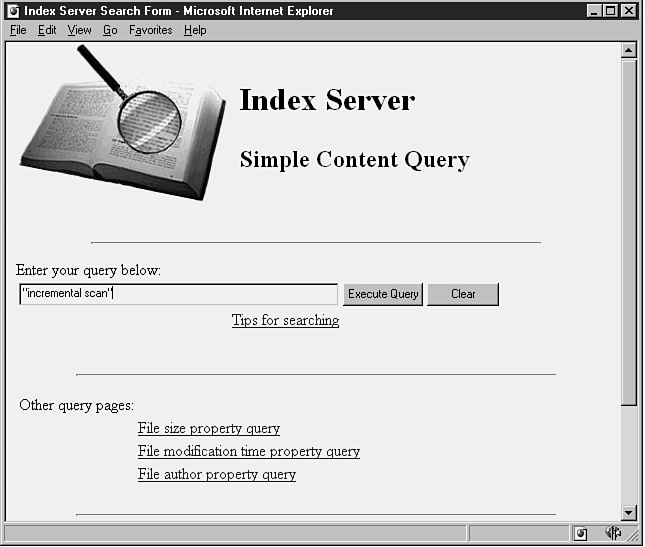
Index Server provides the ability to develop customized forms that allow users to easily construct and submit queries. These forms are created using standard HTML and invoke and query script files to be run by Index Server. Figure 2.1 is an example of such a query form. In this figure, we are simply querying against documents in our test site using the default sample query form delivered with Index Server. In this case, we have indicated that we want to find all documents with the phrase incremental scan in the contents of the document.
Figure 2.1. Index Server sample content-query form.
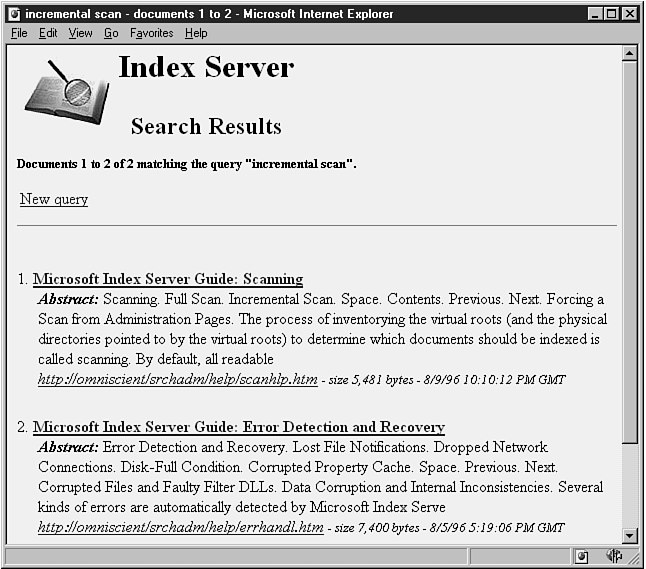
Index Server also provides the ability to design report templates that specify how results of queries should be formatted, sorted, and displayed to the user. Again, this is done using standard HTML with some extensions provided by Index Server. Figure 2.2 illustrates the results of the content query presented in Figure 2.1. Note that the report template functionality of Index Server has allowed the creation of a query-results page that includes details about the query submitted to the server and the number of documents that satisfied the query. Additionally, the report template specified that hypertext links to each matching document be listed along with a document abstract and document properties such as a uniform resource locator (URL) specifying the document location on the server, the size of the file, and the last modification time of the file. Index Server template files provide simple methods for the automatic generation of abstracts of a document's content as well as methods for reporting document properties. On a final note, it is also possible to specify the maximum number of hits to return and the number of results to be listed on each HTML page returned to the user. When necessary, navigational links can be easily added to allow the user to page back and forth between multiple results pages.
Figure 2.2. Index Server sample content-query results page.
By design, Index Server is meant to minimize the amount of administration required. However, there are always cases where sites have specific requirements that must be met, and Index Server provides a variety of methods for administering these needs at each installation.
Administrative script files can be created and invoked from HTML forms to perform the following tasks:
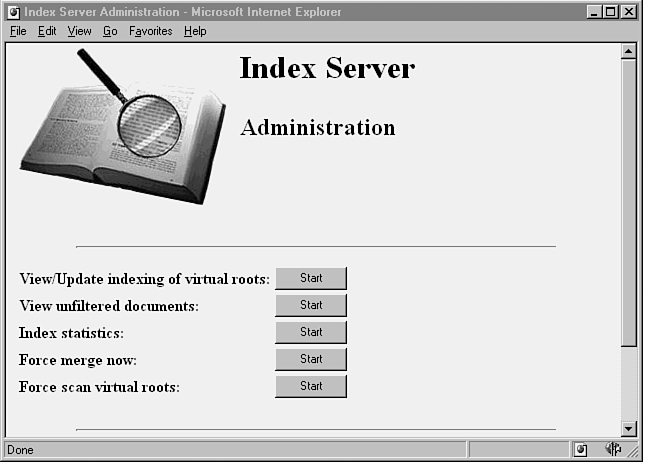
Figure 2.3 presents a simple default Index Server Administration form that is installed with Index Server. This is simply an HTML form with buttons, each of which performs a specific administrative task. For example, clicking the Start button for View/Update indexing of virtual roots field invokes a simple administrative script that determines the virtual roots currently set up for indexing, the corresponding physical path for each root, and the status of the indexing for each root. The script also specifies the report template to use when reporting the results.
Figure 2.3. Index Server Administration HTML form.
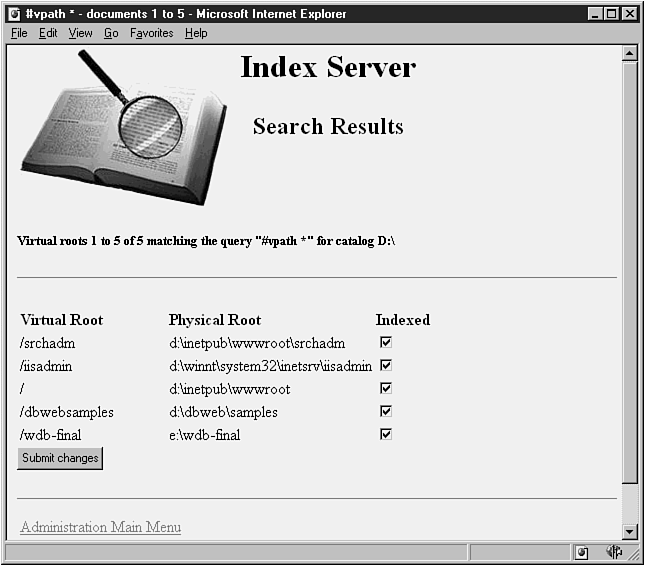
Figure 2.4 illustrates the results of the previous administrative script. In this case, Index Server reports that the current index catalog in use is located on the path D:\ and that five virtual roots are currently set up to be indexed. The corresponding physical path for each root is listed along with the status of indexing for each root. In this case, the checked boxes indicate that all roots have been indexed.
Figure 2.4. Index Server administration/virtual roots report form.
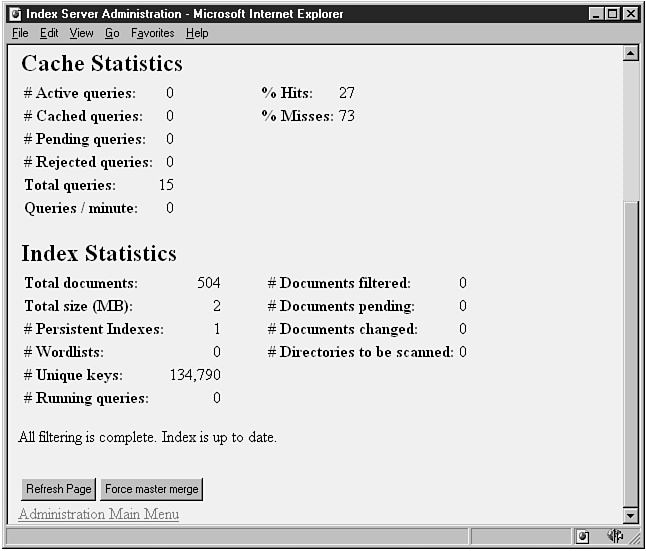
Index Server also provides three main methods by which the performance and status of Index Server can be monitored. The first method involves invoking an administrative script to capture a snapshot of Index Server parameters of interest. Referring to Figure 2.3, if the Start button for the Index statistics task is clicked, a script is invoked that collects the state of several Index Server parameters, formats these results using a predetermined report template, and presents them as an HTML page. Figure 2.5 presents the results of this administrative script. As you can see from the number of parameters reported, it is possible to get a fairly comprehensive snapshot of server performance at a given instant in time.
Figure 2.5. Index Server administration—statistics and status-report form
The second method of performance monitoring supported by Index Server is through the use of the graphical Windows NT Performance Monitor. Using this tool, dynamically updated reports and charts can be created and viewed to ascertain how the server is performing.
The third method of monitoring Index Server is by using the NT Applications Event Viewer. Index Server logs numerous informational, warning, and error messages to this log, which can be very helpful when troubleshooting and tuning your system.
Finally, Index Server takes advantage of logging performed by IIS and PWS. All query and report-template requests against Index Server are also logged in the IIS logs.
Because many on the Web and Internet are open to access by large numbers of people, it is increasingly important to maintain a secure site and to maintain the integrity of content at the site. Index Server provides a number of features that thwart access by unauthorized individuals by controlling document access and by authenticating users. These include
Any information that is to be published, indexed, and queried by Index server should be placed on an NTFS storage volume to take full advantage of NTFS security features. These features are NOT available for files stored on FAT-formatted volumes. Catalog and registry files should also be placed on NTFS volumes, and ACL entries should be set to ensure that only the administrator has the ability to peer into or modify these files. This helps ensure that no one tampers with or accidentally corrupts these critical files.
To fully learn and understand Index Server requires the introduction of some terms and concepts that are new to many readers. Following are brief descriptions of some of the more fundamental terms and concepts that will be covered in greater depth throughout the remainder of this book.
Index Server uses three basic types of files to allow the development of custom query forms, formatted results pages, and administrative scripts. These files are
These files are very similar to those implemented by IIS and should be quite familiar to those developers who have developed applications using the IIS IDC component and/or Microsoft dBWeb.
Internet data query (.idq) files are used to specify the parameters used to perform a query, such as:
HTML extension files are template files that specify how result sets returned from a query are formatted and displayed to the user. These files are written in HTML format using extensions provided by Index Server and Internet Information Server. These files are typically designed to work in tandem with variables in specific .idq files. Detailed information on the use of .htx files is presented in Chapter 8, "HTML Extension Files."
Index data-administration files are used for performing basic Index Server administrative tasks such as:
These files are very similar to .idq files except they are used strictly for specifying scripts to handle administrative functions rather than queries.
This chapter provides a basic primer and overview of Index Server, how it can be used, its capabilities, and how it interacts with Microsoft IIS. You began with a review of the basic components and capabilities of IIS. These include the WWW service, the FTP service, and the Gopher service, as well as intrinsic security features and administrative tools. Following this was a brief discussion Index Server's capabilities. These include document content and property querying, indexing, server administration, and security features. Finally, you were introduced to a number of fundamental Index Server terms and concepts, which you will see throughout the remainder of the book.