Along with the need to provide access to the vast repositories of data available on the Internet, most information-system managers face another very important issue: the need to offer a user-friendly interface that not only provides quick result sets and is easily accessible, but one that is also accurate. To effectively address this issue, document managers must properly index their data to reduce the time required by end-users to narrow queries to the result set that most accurately reflects the desired information.
In this chapter you will learn about the different methods of document indexing and how each method plays a different role when you are designing your searchable document repositories. Later in the chapter, a discussion of queries and result sets focuses on how end-users can pinpoint the set of documents they want to access by shaping their query to reduce not only the size of the set of documents returned, but also the time it takes process the query.
Microsoft Index Server supports both content indexing (sometimes referred to as property indexing) and full-text indexing. Additional indexing capabilities are included in Index Server that support query features such as wildcards searches (for example, birth* would match birthday), proximity searches (words or phrases near another word or phrase), and linguistic stemming (for example, run** is expanded to running, ran, and so on). Through these methods, and in coordination with the use of query forms, site managers can properly index document repositories to provide quick and accurate result sets based on end-user queries.
Content indexing might best be described as the capability to index the properties or fields of specific documents as well as the actual text of the document. Index Server uses filters to identify the structure or format of the documents to be indexed. Filters can be written to identify specific fields or properties of a document. A default set of filters is included with Index Server that can index HTML, Microsoft Word, Microsoft Excel, Microsoft PowerPoint, and plain-text documents.
Content indexing can dramatically reduce the execution time of a query because the entire index is not searched. Instead, a subset of the index data is searched for a match of the query criteria. Think of content indexing in terms of a database table that includes indexed fields of information specific to a single row. A query based on information contained within a single column needs only target that specific subset (column) of the overall table data.
Using the database analogy, consider a group of mail documents that have been indexed with a filter written specifically for the format of a standard mail document. Most mail documents include a minimal set of fielded data. A few of these fields might include the sender's name, the sender's e-mail address, the recipient's name, the recipient's e-mail address, the subject line, the delivery priority, and the body text of the mail document. Through content indexing, a query can target only the sender's name of the mail documents and can quickly generate a result set that would include, for example, a sender's name of Mark Swank.
Full-text indexing differs from content indexing in that the entire document is indexed and the entire index must be searched for a match against the query criteria. Consequently, full-text index searches tend to take much longer than content index searches. This method of indexing is probably the most commonly used primarily because most end-users fail to recognize the benefits of narrowing the document search to a specific set of documents or properties (fields) of documents. However, through properly crafted query forms, you can provide your end-users with a front-end query interface that allows them to narrow their resulting set of document matches.
To better understand how Index Server operates, you must understand the three components that constitute a query. The first component is the query scope, or the set of documents to be searched. The second component is the restrictions placed on the query to reduce or refine the matching documents. And finally, the remaining component of a query is the actual result set, or matching documents.
Understanding each query component will greatly increase your knowledge of how to properly construct a query to reduce both the result set and the time of query execution. Remember, query results are only as good as the query that generated them. In this section you'll learn about each query component and how to fine-tune your query and reduce your query result set by understanding which query features are supported by Index Server and how they are implemented in conjunction with Microsoft Internet Information Server (IIS) and Peer Web Services (PWS).
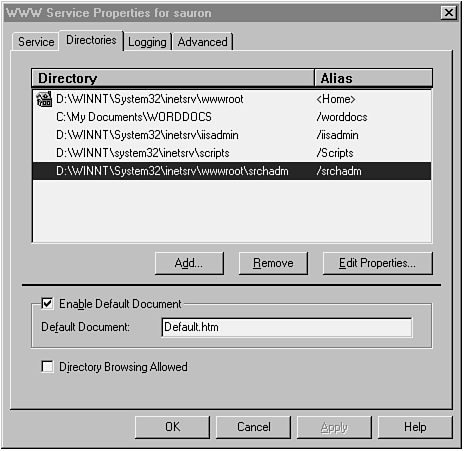
Query scopes are the first component of a query. They are used to identify the set of documents that will be searched for matching result documents. These scopes are generally specified as directory paths (such as C:\My Documents\WORDDOCS) on disk drives and correspond to virtual directories that are defined in IIS and PWS Web sites. These virtual directories are then indexed by Index Server. Query scopes (virtual directories) need not be located in the Web-server document-root domain; rather, they need only be network accessible by the Web server where IIS or PWS is currently active.
IIS virtual directories that contain executable scripts are not considered to be scopes and thus are not known to Index Server.
Figure 1.1 displays the directory properties (virtual directories) for a sample IIS implementation.
Figure 1.1. Sample Internet Information Server directory properties.
Index Server indexes documents based on virtual directory (scope) entries in IIS. However, all virtual directories in an IIS or PWS implementation need not be indexed. The administrator has the option to index or not index any of virtual directories in the IIS or PWS site.
Queries against Index Server catalogs need not be limited to a single scope; rather, they can be executed against multiple scopes.
The restrictions placed against the scope of documents to be searched are probably the most important part of a query. These restrictions allow the end-user to reduce and refine the result set of documents (as closely as possible) to the intended set of matching documents. Knowing how to use these restrictions can greatly enhance the effectiveness of the Index Server.
In this section you'll learn how boolean, proximity, relational, and wildcard operators are used in conjunction with query terms to restrict the result set. Other restriction capabilities such as free-text, vector-space, and property-value queries are also discussed.
Boolean operators can be expressed either as either keywords or as symbols, and are used to evaluate expressions when determining a document match. The three boolean operators are AND, OR and NOT. As with most programming languages, you can add parentheses to nest expressions in a query. Expressions contained in parentheses are evaluated before all other expressions.
The AND operator has a higher precedence than the OR operator. For example, x AND y OR z is equivalent to (x AND y) OR z, and z OR x AND y is equivalent to z OR (x AND y). However, because parentheses are evaluated before all other expressions, (z OR x) AND y is not equivalent to z OR x AND y.
Table 1.1 describes each of the boolean operators and provides and example using both the keyword and the symbol.
| Keyword | Symbol | Description | Example | |
| AND | & | TRUE if the terms on both sides of the expression evaluate TRUE. | vote AND republican | vote & republican |
| OR | | | TRUE if a term on either side of the expression evaluates TRUE. | Dole OR Kemp | Dole | Kemp |
| NOT | ! | TRUE if the term following NOT evaluates FALSE. | Newt AND NOT Bill | Newt & ! Bill |
For languages other than English, see Table 1.2 for a listing of boolean-operator keywords.
| Language | AND | OR | NOT |
| German | UND | ODER | NICHT |
| French | ET | OU | SANS |
| Spanish | E | O | NO |
| Dutch | EN | OF | NIET |
| Swedish | OCH | ELLER | INTE |
| Italian | E | O | NO |
The use of double quotes (") is permitted in a query to indicate that the enclosed string is to be searched for in the scope documents. The use of double quotes is required to ensure that boolean-operator keywords included in the quoted string should be ignored in the query rather than evaluated. For example, the query "Barnes and Noble" will match pages with the phrase Barnes and Noble, not pages that include both of the strings Barnes and Noble.
Depending upon the type of query, the NOT operator has special restrictions. For example, the NOT operator can be used in content queries only after an AND operator to exclude pages that match a previous content restriction like so:
Ronald AND NOT Reagan
Using this example, documents that contain the word Ronald but not the word Reagan would match the query.
For property-value queries, the NOT operator can be used apart from the AND operator like so:
NOT @DocAuthor = Mark Swank
This example would return all documents where the document author is not Mark Swank.
The proximity operator is identified by the keyword NEAR or the tilde (~) symbol. Like boolean operators, proximity operators can be expressed either as keywords or as symbols, and the use of double quotes is required to specify that the NEAR keyword be ignored as an operator and evaluated as a string.
For languages other than English, see Table 1.3 for a listing of proximity-operator keywords.
| Language | NEAR |
| German | NAH |
| French | PRES |
| Spanish | CERCA |
| Dutch | NABIJ |
| Swedish | NÄRA |
| Italian | VICINO |
The NEAR operator is similar to the AND operator in that NEAR returns a match (TRUE) if both words being searched for are found in the same document. However, the NEAR operator differs from AND in that the rank assigned by NEAR depends on the proximity of the two words. That is, the closer together the two words appear in the document, the greater the ranking.
Consider the following sample query and text strings:
driving NEAR ranges
Text1: Driving ranges are a golfer's favorite pastime.
Text2: The average driving age today ranges between 25–30.
Of these two text strings, Text1 will have a higher ranking than Text2 because the strings driving and ranges appear closer to one another in the sentence.
If the searched-for words appear more than 50 words apart, they are not considered near enough to garner a ranking. Consequently, the page is assigned a rank of 0.
Relational operators are available for use in relational property queries. Table 1.4 displays the available relational operators and examples of each operator.
| Symbol | Example | Description |
| < | @size < 4000 | Less than 4000 bytes |
| <= | @write <= 96/09/18 | Updated before or on 96/09/18 |
| = | @DocAuthor = Robert Swank | Authored by Robert Swank |
| != | @Create != 96/03/07 | Not created on 96/03/07 |
| >= | @DocWordCount >= 2000 | Word count >= 2000 |
| > | @Rank > 500 | Ranking greater than 500 |
The use of the asterisk (*) wildcard character is probably familiar to users who have experience with the command-line search syntax for most operating systems. For example, have you ever executed a rm *.* command only to find out that you just accidentally erased all the files in your current directory? If so, you were using the asterisk (*) wildcard operator to identify those files for removal.
Index Server also supports the wildcard character, in addition to word stemming, for defining document queries. For example, you can easily search for all documents containing the words governor, government, and govern by using a wildcard such as govern*. Notice that a single wildcard character requires any characters before and after it to be exact matches.
Word stemming (using two wildcard characters) takes wildcards one step further and allows words that match the stem of the preceding characters to generate a query match. For example, fly** matches words based on the same stem as fly, such as flying, flown, flew, and so on.
Free-text queries search not for exact words, but rather for similar meanings. When presented with a free-text query, the Index Server query engine finds pages that best match the words and phrases in the free-text query. When specifying free-text queries, the text string is prefixed with the string $contents.
Boolean, proximity, and wildcard operators are ignored in free-text queries.
Let's look at an example free-text query:
$contents How do I configure an Ethernet card?
Using this free-text query, the query engine would find documents that mention topics such as configuring, Ethernet, and card.
Vector-space queries provide a mechanism for the query engine to match a list of words and phrases. Additionally, weight can be added to each search word or phrase to increase the ranking returned by the query engine. To see how vector-space queries are referenced, look at this sample query, which targets information about developing World Wide Web database applications:
database[50], develop*[25], www, "world wide web"[100]
Because the string www is widely accepted as the hostname for most Web servers, it will probably hit any document that has a uniform resource locator (URL). So be careful when searching for widely used terms.
As you can see in the preceding query, the string "world wide web" carries a higher weight ([100]) than the other terms. The term develop* will hit words like developer, development, developed, and so on.
Vector-space queries do not require the query engine to return documents that match each and every term specified in the query.
One of the most advantageous features of Index Server is its ability to query the properties of documents. While most indexing and search engines used on the Internet today provide standard full-text search capabilities, Index Server goes one step further by including support for filters, which allow sites to index the properties of non-standard text-based documents such as Word, Powerpoint, and other ActiveX-aware applications.
Property-value queries can be used to find documents with matching properties. The properties available to query include basic file information such as the document name, creation time, update time and file size. Other properties such as those available in documents created by ActiveX-aware applications can also be queried by Index Server. An example of an ActiveX-aware property would be the document summary (abstract).
Index Server supports two different types of property queries: relational and regular-expression property queries.
When generating relational queries, precede the property name with the at (@) symbol. When generating regular-expression queries, precede the property name with the number-sign (#) symbol.
The query syntax for relational queries is as follows:
Syntax: @<property name> <relational operator> <property value>
Example: @Write > 96/09/19
The query syntax for regular-expression queries is as follows:
Syntax: #<property name> <regular expression>
Example: #filename *.doc
Table 1.5 displays the general rules that apply when using regular expressions.
| Character | Rule |
| All characters except the asterisk (*), period (.), question mark (?), and vertical bar (|). | Character will match itself. |
| Space ( ) or close parenthesis ()) | Must be enclosed in matching quotes (") if the character is to be evaluated inthe search. |
| Asterisk (*) | Character will match any number of characters. |
| Period (.) | Character will match a period or end of string. |
| Question mark (?) | Character will match any one character. |
| Vertical bar (|) | Character is an escape character and may precede certain special characters. |
You can match special characters such as the asterisk (*), period (.), and question mark (?) by enclosing them in brackets. For example, www|[.]fas|[.]usda|[.]gov will match www.fas.usda.gov.
Table 1.6 displays the rules that apply when the vertical bar (|) escape character precedes other characters in regular expressions.
| Character | Rule |
| Open parenthesis (() | Opens a group and must be followed by a matching closed-parenthesis character. |
| Closed parenthesis ()) | Closes a group and must be preceded by a matching open-parenthesis character. |
| Open bracket ([) | Opens a character class and must be followed by a matching (unescaped) closing-bracket character. |
| Closed bracket (]) | Closes a character class and must be preceded with a matching open-bracket character. |
| Open curly brace ({) | Opens a counted match and must be followed by a matching closed curly-brace character. |
| Closed curly brace (}) | Closes a counted match and must be preceded by a matching open curly-brace character. |
| Period (.) | Separates OR clauses. |
| Asterisk (*) | Matches zero or more occurrences of the preceding expression. |
| Question mark (?) | Matches zero or one occurrences of the preceding expression. |
| Plus sign (+) | Matches one or more occurrences of the preceding expression. |
Table 1.7 displays the rules that apply when characters are enclosed in square brackets in regular expressions.
| Character | Rule |
| Any character | Matches itself except for the caret, closed bracket, and dash characters. |
| Caret (^) | Must be the first character; matches everything except classes that follow it. |
| Close bracket (]) | Matches itself. May only be preceded by the caret character, or else it closes the class. |
| Dash (-) | Range operator that is preceded and followed by normal characters. |
Table 1.8 displays the rules that apply when characters are enclosed in curly braces in regular expressions.
| Syntax | Rule |
| |{m|} | Counted match that matches exactly m occurrences of the preceding expression. |
| |{m,|} | Counted match that matches at least m occurrences of the preceding expression. |
| |{m,n|} | Counted match that matches between m and n occurrences of the preceding expression, inclusive. |
The properties of every document or file indexed by the CiDaemon are identified by their property name. Properties are referenced by preceding the property name with a $ character.
Table 1.9 describes each of the available document properties that can be queried by Index Server.
| Property Name | Datatype | Description |
| Access | DBTYPE_DATE | Most recent time document was accessed. |
| All | (none) | All property values are searched. Value can be queried but not retrieved. |
| AllocSize | DBTYPE_I8 | Allocated disk space for document. |
| Attrib | DBTYPE_UI4 | Document attributes. |
| ClassId | DBTYPE_GUID | Class ID of object. |
| Change | DBTYPE_DATE | Time of last document change. |
| Characterization | DBTYPE_WSTR or DBTYPE_BYREF | Characterization (abstract) of document. |
| Contents | (none) | Main body contents of document. Value can be queried but not retrieved. |
| Create | DBTYPE_DATE | File-creation time. |
| DocAppName | DBTYPE_STR or DBTYPE_BYREF | Name of application that created the document. |
| DocAuthor | DBTYPE_STR or DBTYPE_BYREF | Document author. |
| DocCategory | DBTYPE_STR | Type of document (such as memo, schedule, or any text document). |
| DocCharCount | DBTYPE_I4 | Number of characters in the document. |
| DocComments | DBTYPE_STR or DBTYPE_BYREF | Document comments. |
| DocCompany | DBTYPE_STR | Name of the company for which the document was written. |
| DocCreatedTm | DBTYPE_DATE | Document-creation time. |
| DocEditTime | DBTYPE_DATE | Total time spent editing the document. |
| DocKeywords | DBTYPE_STR or DBTYPE_BYREF | Document keywords. |
| DocLastAuthor | DBTYPE_STR or DBTYPE_BYREF | Most recent user who edited the document. |
| DocLastPrinted | DBTYPE_DATE | Time document was last printed. |
| DocLastSavedTm | DBTYPE_DATE | Time document was last saved. |
| DocManager | DBTYPE_STR | Name of the manager of the document's author. |
| DocPageCount | DBTYPE_I4 | Number of pages in document. |
| DocRevNumber | DBTYPE_STR or DBTYPE_BYREF | Current version number ofdocument. |
| DocSubject | DBTYPE_STR or DBTYPE_BYREF | Subject of document. |
| DocTemplate | DBTYPE_STR or DBTYPE_BYREF | Name of template for document. |
| DocTitle | DBTYPE_STR or DBTYPE_BYREF | Document title. |
| DocWordCount | DBTYPE_I4 | Number of words in document. |
| FileIndex | DBTYPE_I8 | Unique ID of file. |
| FileName | DBTYPE_WSTR or DBTYPE_BYREF | Name of file. |
| HitCount | DBTYPE_I4 | Number of words matching queryin document. |
| HtmlHRef | DBTYPE_WSTR or DBTYPE_BYREF | Text of HTML HREF. Can bequeried but not retrieved. |
| HtmlHeading1 | DBTYPE_WSTR or DBTYPE_BYREF | Text of HTML document in style H1. Can be queried but not retrieved. |
| HtmlHeading2 | DBTYPE_WSTR or DBTYPE_BYREF | Text of HTML document in style H2. Can be queried but not retrieved. |
| HtmlHeading3 | DBTYPE_WSTR or DBTYPE_BYREF | Text of HTML document in style H3. Can be queried but not retrieved. |
| HtmlHeading4 | DBTYPE_WSTR or DBTYPE_BYREF | Text of HTML document in style H4. Can be queried but not retrieved. |
| HtmlHeading5 | DBTYPE_WSTR or DBTYPE_BYREF | Text of HTML document in style H5. Can be queried but not retrieved. |
| HtmlHeading6 | DBTYPE_WSTR or DBTYPE_BYREF | Text of HTML document in styleH6. Can be queried but notretrieved. |
| Path | DBTYPE_WSTR or DBTYPE_BYREF | Full physical pat of document.document. This includes thedocument name. |
| Rank | DBTYPE_I4 | Rank of row. Ranges from 0 to 1000. Larger numbers indicate better matches. |
| RankVector | DBTYPE_I4 or DBTYPE_VECTOR | Ranks of individual components of a vector query. |
| SecurityChange | DBTYPE_DATE | Last time security was changed on the document. |
| ShortFileName | DBTYPE_WSTR or DBTYPE_BYREF | DOS short (8.3) file name. |
| Size | DBTYPE_I8 | Number of bytes in the document. |
| USN | DBTYPE_I8 | Update Sequence Number. NTFS drives only. |
| VPath | DBTYPE_WSTR or DBTYPE_BYREF | Full virtual path to document. This includes the document name. |
| WorkId | DBTYPE_I4 | Internal ID for document. |
| Write | DBTYPE_DATE | Last time document was written. |
If no property name is specified, @contents is assumed.
Up to this point, you've learned about defining the document scope (those sets of documents that the query engine will target for matches) and the actual query syntax. But you have yet to learn what happens to documents that match the query. This is where result sets come into play.
Index Server does not simply return all matching documents to the client. Rather, it first performs several checks before returning information about matching documents. One of these checks is for security restrictions (or access-control lists) to verify that the user launching the query has permission to see the document. The second check is to determine how the information will be presented to the user. And finally, a third check determines how many hits to return to the user. In the following sections, you'll focus on each of these final result set checks.
Before the query engine can build the result set of information pertaining to the documents to be returned to the user, it must verify user access to the documents. If the corpus is stored on a Windows NT File System (NTFS) volume, Index Server must check the access-control list (ACL) for the document. If the user does not have read access to the document, he cannot see the document, nor be aware that the document met the search criteria.
For example, consider a query that searched for the text Joe Smith. If a document existed pertaining to the firing of Joe Smith because of disciplinary reasons, it would most likely have access-control-list permissions set so that only the Human Resources group (or upper-level management) of the company could view it. You certainly wouldn't want any company person to query the document and be able to determine the topic of discussion based on the subject (Employee Termination for Disciplinary Reasons) of the document. As you can see, if the user launching the query does not have read-access privileges, he cannot know that the document matched a query.
Another restriction the administrator (or form author) can place on the query engine is to limit the maximum number of hits returned to the client. Why would you want to do this? Well, you certainly wouldn't want a user to generate the dreaded search for all documents with the text XYZ Company in them. As you can probably guess, most company documents have the company name in them. A query such as this would place a heavy load on the server to generate the result set for such a query. To limit such an event, a restriction can be placed on the number of hits returned to the client. For example, a result set of 500 hits can be returned the client in 10 pages of 50 hits each.
Even though the query form determines the number of hits returned per page, you can give your end-users the ability to specify the number of hits to be returned.
Finally, the client can specify the specific properties to return in a result set. Any property that is valid in a query restriction is valid as a result column. However, the administrator can also restrict the properties returned by a query.
An abstract is generated on documents as they are indexed by Index Server, and briefly summarizes the content of the document. An abstract is a document property that can be part of a query and returned in the result set. Although many search engines display the first 30–50 words of a document, few can build very good document abstracts.
In this chapter you learned how documents are indexed and how they can be searched. Understanding how documents are indexed can dramatically increase your ability to generate queries that will return the specific result set documents you are targeting. Knowing how to properly build query strings based on the methods used when indexing the documents allows end-users to leverage the power of the indexing and querying technologies and to reduce the time required to search and retrieve the desired result set documents.